1.11 Install Desktop App
Vault

This guide walks you through installing the Drylab Desktop App on macOS, Windows, and Linux. Before installing, make sure your system meets the minimum requirements.
Minimum system requirements:
MacOS
OS X 13 (Ventura) or newer OS
16GB installed RAM (32GB or more recommended)
40GB of Storage
Windows
Windows 10 or newer OS
16GB installed RAM (32GB or more recommended)
40GB of Storage
Linux
Ubuntu 22.04 (Jammy Jellyfish) or newer OS
16GB installed RAM (32GB or more recommended)
40GB of Storage
*GPU support is not available at the moment. This feature will be supported soon.
1. Install on macOS
Go to the download page: https://thedrylab.com/desktop-app-download
Choose the installer that matches your processor:
Mac (Apple Silicon) – for M1 / M2 / M3 chips
Mac (Intel) – for Intel-based Macs
Download the .dmg installer.
Open the downloaded file.
Follow the installation:
Accept the license agreement
Choose the installation location
Click Install
Open Applications → Drylab to launch the app.
Sign in with your Drylab account to start using the platform.
2. Install on Windows
Visit the download page: https://thedrylab.com/desktop-app-download
Download the Windows installer (.exe).
Open the downloaded file.
Follow the installation:
Accept the license agreement
Choose the installation location
Click Install
Once installation is complete, open Drylab Desktop from the Start Menu.
Log in to your Drylab account.
3. Install on Linux
Go to the download page: https://thedrylab.com/desktop-app-download
Copy the install command
If dependencies are required, run:
Launch Drylab from the Applications menu or by running:
Sign in with your Drylab account.
Launching the App
When opening the Drylab Desktop App for the first time, the application will automatically install the required packages and environment components.
This step may take several minutes depending on your system and internet connection.
During the setup process, you will also be able to select the directory where Drylab will store all notebooks, datasets, and generated files.
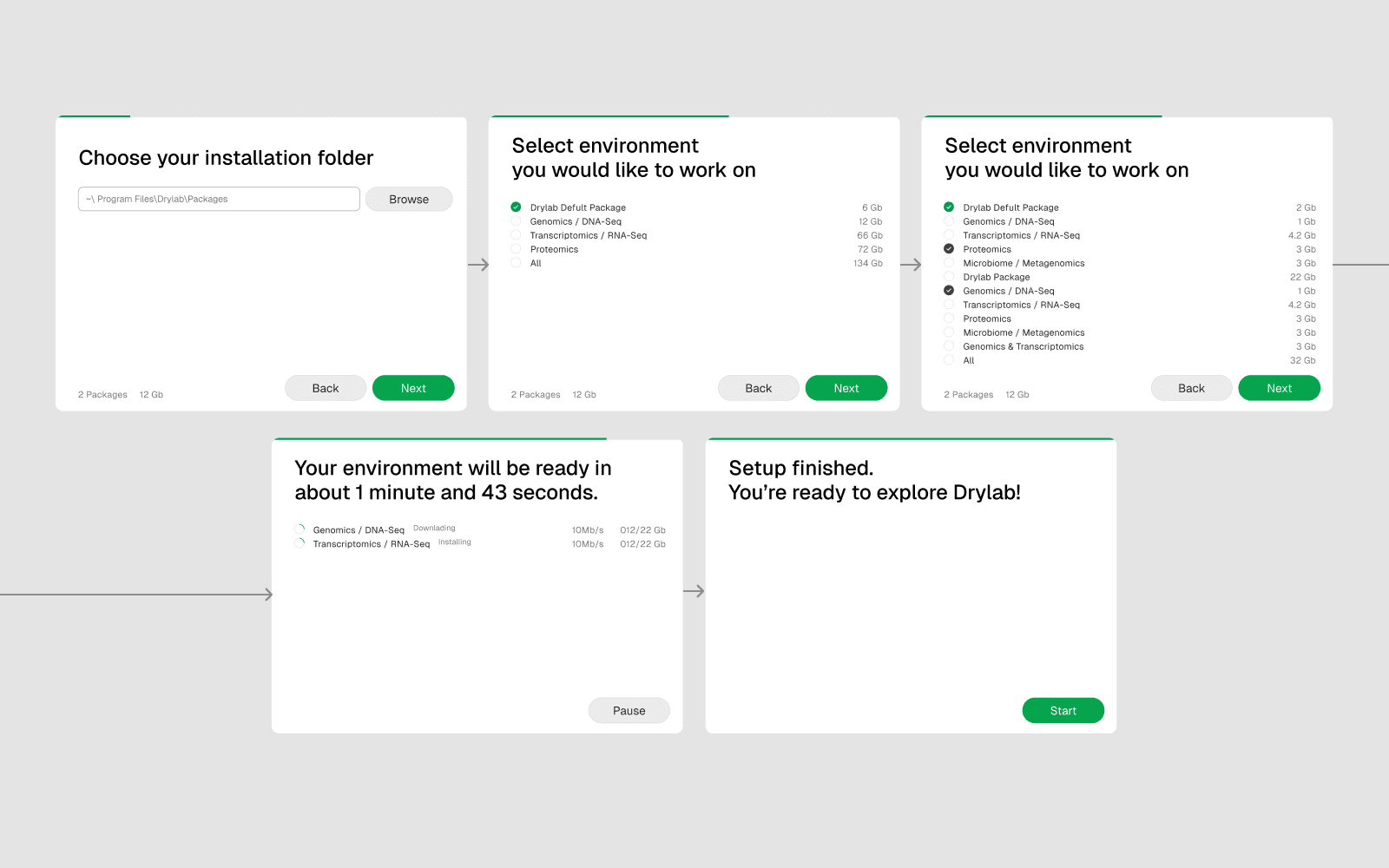
Once the setup is complete, you can sign in and start using Drylab.